
How to Measure a Speaker for New Foam or Rubber Surrounds

Don’t let rotted foam or cracked rubber ruin a perfectly good pair of vintage speakers. Repairing them yourself at home is easier than you think, but there is one crucial step you have to get right before you break out the glue: getting the right measurements.

Buying a replacement surround isn’t as simple as just knowing you have an "8-inch speaker." Different audio manufacturers used completely different chassis and cone dimensions. To ensure a perfect, airtight seal, you just need a ruler or digital callipers to take two essential measurements in millimeters (mm).

Here is exactly how to measure your speaker like a professional audio technician.

📐 The 2 Essential Measurements You Need

When looking at our replacement surround kits, you will see the dimensions listed in millimeters. Measure your actual speaker driver across the exact centre from edge to edge to find these two values:

1. Outer Diameter (OD)

This is the total width of the entire replacement ring. To measure this on your speaker, find the widest part of the old surround where it glues down to the metal outer lip (the basket) of the speaker frame.

2. Inner Diameter (ID)

This is the measurement of the very inside edge of the replacement ring.

Pro-Tip if you can't measure the old Inner Diameter: If your old foam is completely gone and you don't know the exact inner diameter, don't worry! Simply measure the width of the speaker cone itself, and then allow for a 5mm overlap where the new foam will sit on top of the cone. This 5mm overlap ensures you have a decent, secure gluing area to bond the new surround to the cone.


💡 2 Quick Tips for Accurate Measuring

  • Always Measure in Millimeters (mm): Speaker parts are incredibly precise. Measuring in inches leaves too much room for rounding errors, which can result in a loose fit.

  • Close Enough is Usually Good Enough: If your measurement is within 2mm to 5mm of a kit listed on our site, it will almost certainly fit. The foam and rubber materials have a small amount of natural flexibility.


Ready to Bring Your Speakers Back to Life?

Once you have your dimensions written down, you can head straight over to our Speaker Surrounds by Size Collection to find your matching kit. All of our premium repair kits come with high-quality surrounds, specialised T7000 speaker glue, and an applicator brush to make the job effortless.

If you get stuck or your measurements look completely unique, don't guess! Drop us a message through our website chat with your speaker's make, model, and dimensions, and we'll point you to the exact kit you need.

Back to blog

Instructions

Instructions

Required Equipment

  • New speaker surrounds
  • Screwdriver (for speaker removal)
  • Utility knife
  • Rubbing alcohol or lacquer thinner
  • Speaker repair glue
  • Wood chisel (optional, for stubborn residue)

Step-by-Step Instructions

Phase 1: Disassembly & Cleaning

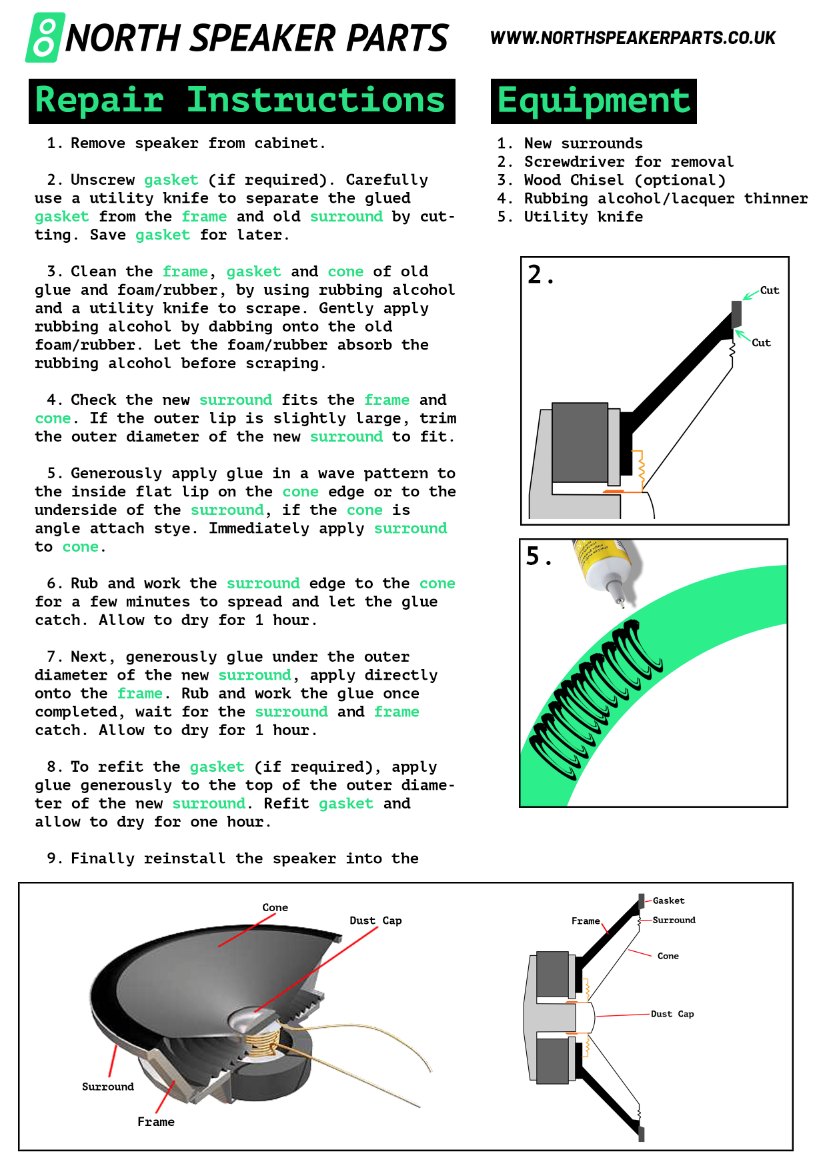
  1. Remove the Speaker: Unscrew the speaker driver from the cabinet and disconnect the wires.
  2. Detach the Gasket: If your speaker has a gasket, use a utility knife to carefully slice through the glue separating it from the frame and old surround. Save the gasket for reinstallation later.
  3. Clean the Surfaces: Dab rubbing alcohol onto the old foam/rubber residue on the frame, gasket, and cone. Let it soak in to soften the glue, then carefully scrape it clean using your utility knife or chisel. The surfaces must be completely clean and dry before proceeding.

Phase 2: Fitting & Gluing the Inner Edge

  1. Dry Fit the New Surround: Place the new surround onto the cone and frame to check the fit. If the outer lip is slightly too large, carefully trim the outer edge with your utility knife.
  2. Glue Surround to Cone: * If the cone has a flat lip, apply glue in a continuous wave pattern directly to that lip.If the cone is angled, apply the wave pattern of glue to the underside of the inner surround lip.Apply the surround to the cone immediately after gluing.
  3. Secure the Inner Bond: Gently rub and work the inner edge of the surround against the cone for a few minutes to ensure the glue spreads evenly and begins to tack. Allow it to dry for 1 hour.

Phase 3: Gluing the Outer Edge & Reassembly

  1. Glue Surround to Frame: Lift the outer edge of the surround and apply a generous layer of glue directly onto the speaker frame underneath. Press the surround down, working it with your fingers to ensure a good bond. Allow it to dry for 1 hour.
  2. Reattach the Gasket: If you removed a gasket in Step 2, apply a layer of glue to the top outer diameter of the new surround. Press the gasket firmly back into place. Allow it to dry for 1 hour.
  3. Reinstall the Speaker: Reconnect the speaker wires and screw the speaker driver back into its cabinet.

Pro-Tips for Success

  • Take Your Time Scaping: The bond of your new surround is only as good as the cleanup job. Don't rush the removal of the old glue.
  • The Wave Pattern: Gluing in a tight "S" or wave pattern ensures full surface coverage without creating a massive, runny mess when pressed down.
Button label